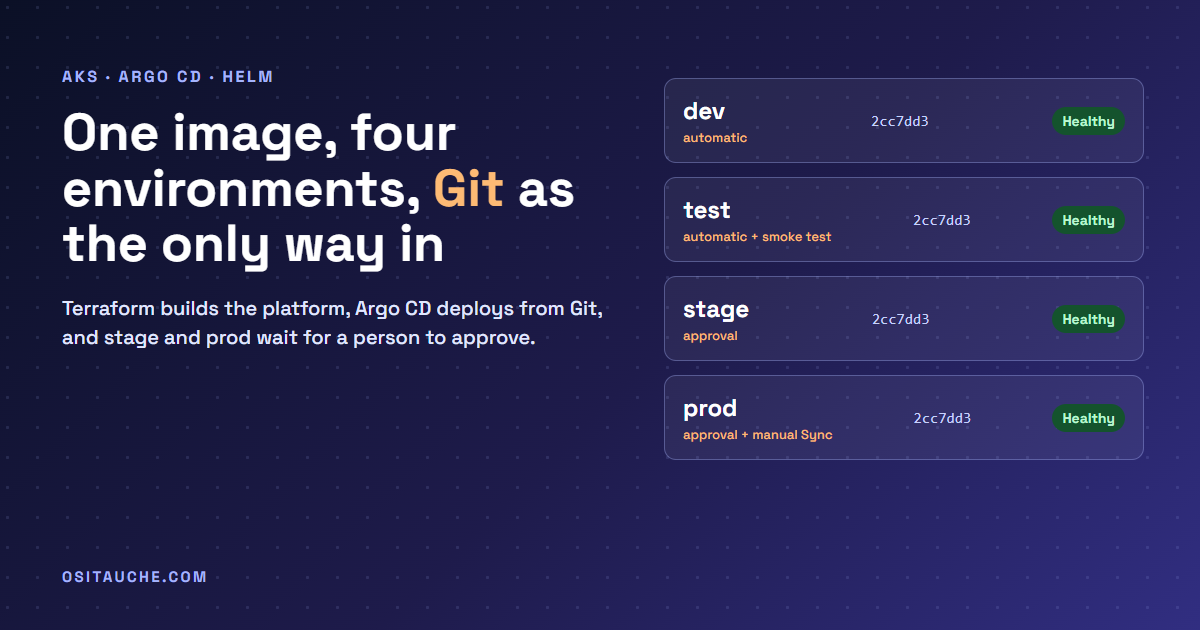
Summary: This guide runs a real Azure OpenAI app on Azure Kubernetes Service (AKS) in four environments, dev, test, stage and prod, the GitOps way. Terraform builds the platform. Helm packages the app once. Argo CD deploys whatever Git says, so nobody runs kubectl apply. GitHub Actions builds the container image once and promotes that exact image from dev to prod: dev and test automatically, stage after an approval, and prod after an approval plus a manual Sync. Every sign-in uses federated tokens, so there are no keys or client secrets to leak. I built all of it, hit several real problems on the way, and the fixes are in the repo. Everything you need is in github.com/Ositau/policy-assistant-aks-gitops.
The question I get most about deployments isn’t “how do I deploy?”. It’s “how do changes get from dev to prod safely, and how do I know prod is running what we tested?”. This project is my answer, built end to end on a real app rather than a hello-world container.
The app is my Policy Assistant: staff ask questions about company policies, and the answers come only from the documents their Entra ID groups allow. I built it on Azure Container Apps in an earlier guide. Here it moves to Kubernetes without losing that security.
What you’ll end up with
Four copies of the app, each at its own address with a real HTTPS certificate, all running the same image:
| Environment | Address | Pods | How a new version gets there |
|---|---|---|---|
| dev | policy-dev.your-domain | 1 | Automatically after every build |
| test | policy-test.your-domain | 1 | Automatically, once dev passes a smoke test |
| stage | policy-stage.your-domain | 2 | After someone approves it in GitHub |
| prod | policy.your-domain | 2 to 4 (autoscaling) | After an approval, and someone presses Sync in Argo CD |
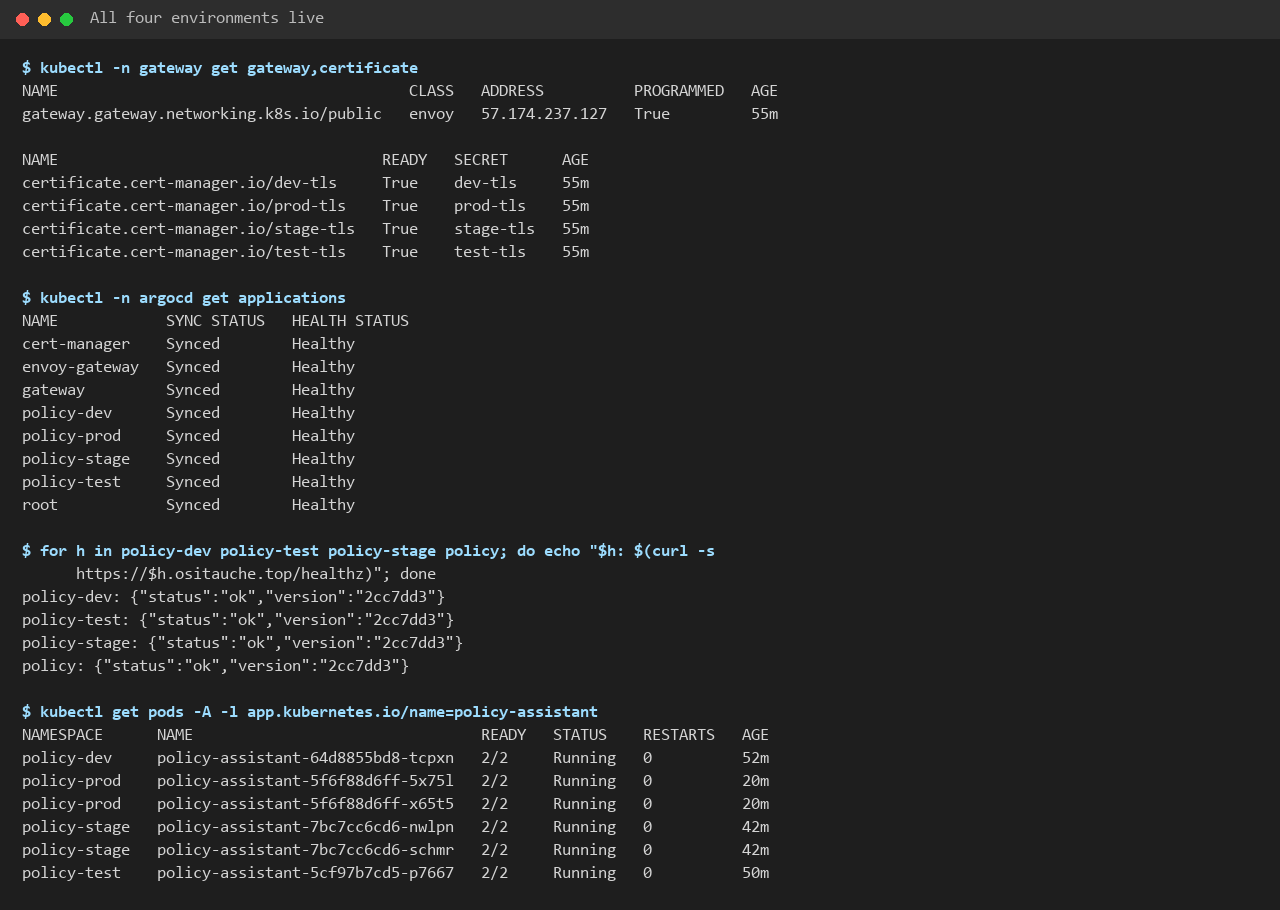
Each environment’s /healthz page reports the image tag it runs, which is the app’s short commit ID. So “is prod running what we tested?” has a one-line answer.
How it works
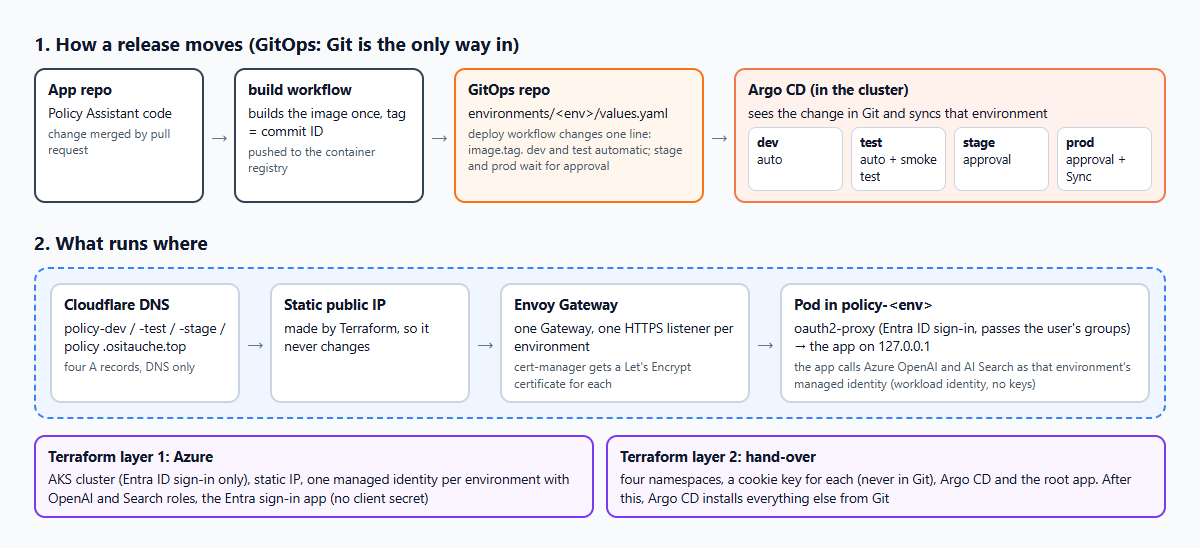
Four tools, each with one job:
| Tool | Its job here |
|---|---|
| Terraform | Builds the platform in Azure, in two layers: the cluster and everything around it, then the hand-over to Argo CD |
| Helm | Describes how the app runs in Kubernetes, once. Each environment is a small settings file |
| Argo CD | Runs inside the cluster and keeps each environment matching Git. If someone changes something by hand, it puts it back |
| GitHub Actions | Builds the image once, then promotes it by changing one line in Git |
The idea that ties it together is GitOps: Git is the only way to change what runs. A deployment is a commit that changes an image tag in a file such as environments/stage/values.yaml. You get a full history of who deployed what and when, and rolling back is reverting a commit.
The security model, in plain English
- GitHub to Azure: GitHub Actions signs in with a federated credential (GitHub proves who it is with a short-lived token). There is no client secret in GitHub.
- People to the cluster: the cluster has local accounts switched off. You sign in to
kubectlwith your Entra ID account, and what you can do is an Azure role assignment. - The app to Azure OpenAI and AI Search: each environment has its own managed identity, and only that environment’s pods can use it (workload identity). dev can’t act as prod.
- Users to the app: oauth2-proxy runs next to the app in the same pod and signs people in with Entra ID, again with a federated token instead of a client secret. It passes the user’s groups to the app, and the app only searches the documents those groups allow.
- The one secret that does exist: oauth2-proxy needs a key to encrypt its session cookie. It isn’t a password to anything. Terraform generates one per environment and puts it straight into the cluster, so it never touches Git.
Before you start
You need:
- The Policy Assistant from my earlier guide, deployed in Azure: its Azure OpenAI resource (with the
gpt-4o-miniandtext-embedding-3-smalldeployments), its Azure AI Search index, its container registry, and the two Entra ID groups “Policy Assistant – Staff” and “Policy Assistant – HR” with a test user in each. This guide reuses all of them and only adds the Kubernetes side. - An Azure subscription where you are Owner, and an Entra ID role that can grant admin consent (Global Administrator or Privileged Role Administrator), for one permission in step 2.
- A domain whose DNS you control. I use Cloudflare; any DNS provider works.
- A GitHub account.
- Quota for 4 vCPUs of a general-purpose VM size in your region. Check with
az vm list-usage -l <region> -o table. New subscriptions sometimes have 0 for some VM families; I usedStandard_D2s_v4because its family had room. - On your machine: Azure CLI, Git, Python 3.10 or later, GitHub CLI (
gh), and kubectl with kubelogin, which you install with:
az aks install-cli
On Windows, run the bash commands in Git Bash, and run export MSYS_NO_PATHCONV=1 first. Without it, Git Bash rewrites anything starting with /subscriptions/ into a Windows path and the Azure commands fail.
What it costs
The AKS control plane is free on the Free tier. You pay for two Standard_D2s_v4 nodes, their disks, a load balancer and one public IP: about £5 a day in Sweden Central. Let’s Encrypt certificates are free, and the app’s Azure OpenAI and AI Search costs are the same as before. I ran the cluster for three days and then deleted it (the last section shows how).
Step 1: Get your own copy and point it at your domain
Fork Ositau/policy-assistant-aks-gitops to your GitHub account. On your fork, open the Actions tab and click I understand my workflows, go ahead and enable them, because GitHub switches workflows off on new forks. Then clone it:
git clone https://github.com/<you>/policy-assistant-aks-gitops.git
cd policy-assistant-aks-gitops
git config user.email "<the email you use on GitHub>"
What’s in it:
| Path | What it is |
|---|---|
scripts/bootstrap.sh |
One-time setup: resource groups, Terraform state, and the identity GitHub Actions signs in with |
scripts/configure.py |
Points your copy at your repo, your domain and your Azure resources |
infra/01-platform |
Terraform layer 1: the cluster, a fixed public IP, one identity per environment, the sign-in app |
infra/02-bootstrap |
Terraform layer 2: the four namespaces, the cookie keys, Argo CD and its root app |
argocd/ |
What Argo CD deploys: two projects, the platform add-ons, and the four environments |
platform/gateway |
The shared Gateway (HTTPS for all four host names), the Let’s Encrypt issuer, the HTTP to HTTPS redirect |
charts/policy-assistant |
The Helm chart for the app |
environments/ |
common.yaml plus one values file per environment |
.github/workflows |
infra, build, deploy and promote |
A handful of values in the repo are specific to my deployment: my repo URL, my domain, and later my Azure IDs. Instead of hunting for them, run the configure script. The first half sets your repo and domain, and clears the image tags so your copy starts with nothing deployed:
python scripts/configure.py repo \
  --repo https://github.com/<you>/policy-assistant-aks-gitops.git \
  --domain <your-domain>
git diff --stat
You should see 10 files changed. Don’t commit yet: the first commit goes in as a pull request in step 5, once the pipeline has what it needs.
The four host names keep their prefixes: policy-dev, policy-test, policy-stage, and plain policy for prod. To use different names, change the environments variable in infra/01-platform/variables.tf and the matching lines in platform/gateway/gateway.yaml and environments/*/values.yaml.
Step 2: Run the one-time setup script
Sign in and pick the subscription:
az login
az account set --subscription "<your subscription name or ID>"
Then run the setup script. BACKEND_RG is the resource group of your existing Policy Assistant:
export MSYS_NO_PATHCONV=1   # Git Bash on Windows only
GITHUB_OWNER=<you> GITHUB_REPO=policy-assistant-aks-gitops \
BACKEND_RG=rg-policy-assistant-demo \
bash scripts/bootstrap.sh
It takes a few minutes and does six things:
- Registers the resource providers AKS needs (ContainerService, Network, Compute, ManagedIdentity, Storage). The pipeline identity isn’t allowed to do this itself.
- Creates two resource groups:
rg-policy-aksfor the cluster andrg-policy-aks-tfstatefor Terraform’s state. - Creates the Terraform state storage account with storage keys switched off, so only Entra ID sign-ins can read it.
- Creates the GitHub Actions identity: an app registration with two federated credentials, one for pull requests and one for
main. No client secret. - Gives that identity only what it needs: Contributor on its own resource group; Reader, push access to the container registry and Azure OpenAI access in the Policy Assistant’s resource group; access to the state; and a role administrator role limited, with a condition, to the five roles this project hands out.
- Grants one Microsoft Graph permission,
Application.ReadWrite.OwnedBy. Terraform creates the sign-in app registration, and this permission lets the pipeline manage only app registrations it owns, not anyone else’s. This is the step that needs admin consent rights.
At the end it prints the values for GitHub:
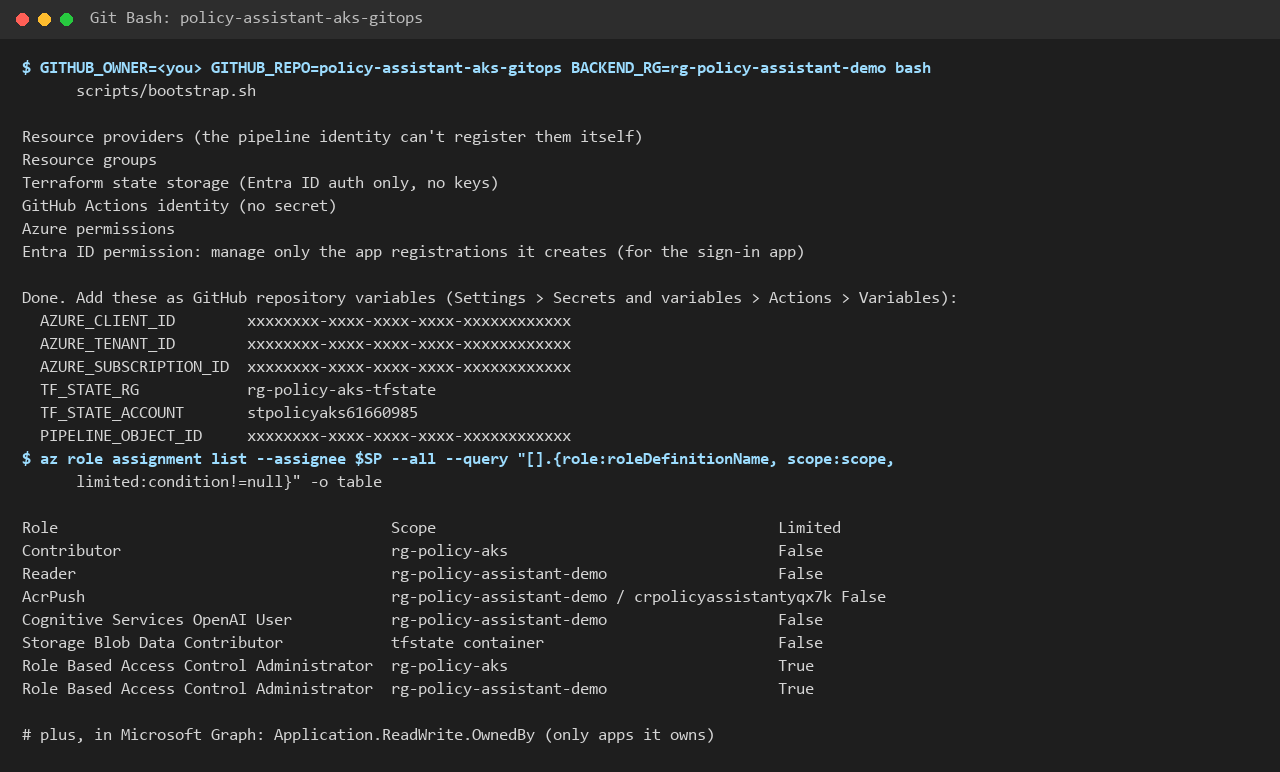
It’s safe to run again: it reuses the app registration and skips anything that already exists.
Step 3: Add the GitHub variables and environments
The pipeline reads everything from repository variables. None of them is a secret. Set them from inside your clone:
gh variable set AZURE_CLIENT_ID       --body "<AZURE_CLIENT_ID from the script>"
gh variable set AZURE_TENANT_ID       --body "<AZURE_TENANT_ID from the script>"
gh variable set AZURE_SUBSCRIPTION_ID --body "<AZURE_SUBSCRIPTION_ID from the script>"
gh variable set TF_STATE_RG           --body "rg-policy-aks-tfstate"
gh variable set TF_STATE_ACCOUNT      --body "<TF_STATE_ACCOUNT from the script>"
gh variable set PIPELINE_OBJECT_ID    --body "<PIPELINE_OBJECT_ID from the script>"
gh variable set ACR_NAME              --body "<your registry name, without .azurecr.io>"
gh variable set AZURE_OPENAI_ENDPOINT --body "https://<your-openai>.openai.azure.com/"
gh variable set TF_VARS_JSON          --body '{"backend_resource_group": "rg-policy-assistant-demo", "openai_account_name": "<your-openai>", "search_service_name": "<your-search>", "container_registry_name": "<your-registry>", "admin_object_id": "<your object ID>"}'
Get your object ID with az ad signed-in-user show --query id -o tsv. It makes you a cluster administrator, so you can use kubectl and the Argo CD dashboard.
Now the GitHub Environments. These are what make stage and prod wait for a person. dev and test need no rules; stage and prod need you as a required reviewer, and only main may deploy to them:
REPO=<you>/policy-assistant-aks-gitops
ME=$(gh api user --jq .id)
for e in dev test; do gh api -X PUT repos/$REPO/environments/$e --silent; done
for e in stage prod; do
  echo "{\"reviewers\":[{\"type\":\"User\",\"id\":$ME}],\"prevent_self_review\":false,
         \"deployment_branch_policy\":{\"protected_branches\":false,\"custom_branch_policies\":true}}" \
    | gh api -X PUT repos/$REPO/environments/$e --input - --silent
  gh api -X POST repos/$REPO/environments/$e/deployment-branch-policies -f name=main -f type=branch --silent
done
You can do the same in Settings > Environments. I used environment approvals rather than pull request reviews for a practical reason: GitHub doesn’t let you approve your own pull request, so if you work alone you’d be stuck. An environment’s required reviewer can be you.
Step 4: Understand the two Terraform layers
Before you apply anything, it helps to know why there are two layers.
Layer 1 (infra/01-platform) creates the Azure side:
- The AKS cluster on the Free tier, two nodes, with workload identity on, Entra ID sign-in only (local accounts off), Azure role-based access for Kubernetes, and Azure CNI Overlay with Cilium so network policies are enforced.
- A static public IP. Kubernetes would happily create a public IP for you, but it would change every time the gateway was reinstalled, and your DNS records would break. Creating it in Terraform means you add DNS records once.
- Permission for the nodes to pull images from your existing registry.
- One managed identity per environment, each trusted only by the
policy-assistantservice account in its own namespace, with the same two roles the Container Apps version has: Azure OpenAI User and Search Index Data Reader. - The Entra ID sign-in app for oauth2-proxy: one sign-in callback per host name, group claims switched on, and four federated credentials instead of a client secret.
Layer 2 (infra/02-bootstrap) is the hand-over to Argo CD. It creates the four namespaces and the cookie key in each, installs Argo CD with Helm, and creates one “root” Argo CD app that points at the argocd/ folder in your repo. From then on, Argo CD installs everything else from Git: Envoy Gateway, cert-manager, the Gateway and the app in all four environments.
Why not one layer? Terraform has a known chicken-and-egg problem when the same configuration creates a cluster and also installs things into it: the Kubernetes providers need the cluster’s address before it exists. Two layers is the clean fix, and it draws a clear line: Terraform owns Azure, Argo CD owns what runs inside the cluster.
Step 5: Apply the platform through a pull request
Commit the configure changes on a branch and open a pull request:
git checkout -b setup
git commit -am "Point the repo at my GitHub repo and domain"
git push -u origin setup
gh pr create --fill
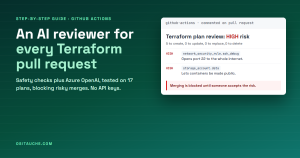
The infra workflow runs on the pull request: it checks formatting and validates both layers, plans layer 1, and posts an AI review of the plan using my AI Terraform reviewer. Layer 2 can’t be planned yet because there is no cluster, so that job says so and skips.
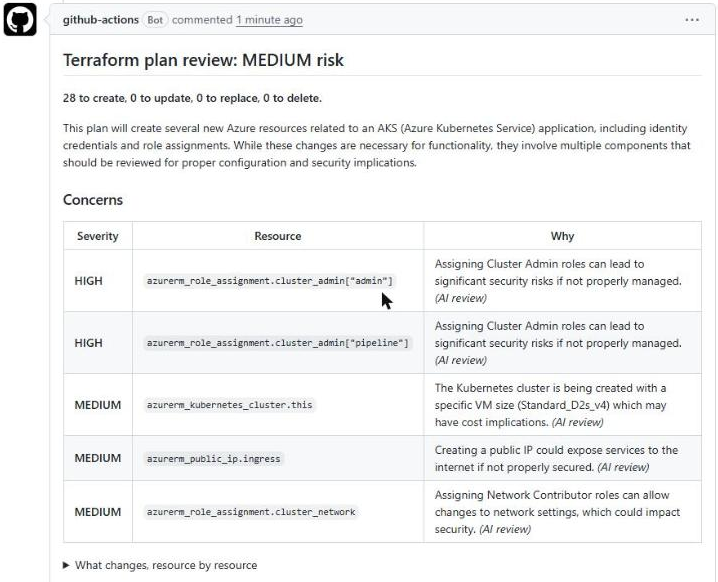
The review flagged the two Cluster Admin role assignments as HIGH. That’s a fair question, so here is how I answered it on the pull request:
- One is for you, the person who runs
kubectland opens the Argo CD dashboard. - One is for the pipeline, which needs it once, for layer 2, to install Argo CD and its cluster-wide resource types. After that, Argo CD deploys everything from Git, not the pipeline.
Both are scoped to this one cluster and visible in its IAM page. I accepted the risk, added a risk-accepted label, and merged. Accepting a HIGH finding should always be a person’s decision.
Merging runs the apply jobs: layer 1 (about 10 minutes, mostly creating the cluster), then a wait until the pipeline’s new admin role works, then layer 2 (a few minutes). The apply job’s summary lists the outputs. The one you need now is ingress_ip.
Step 6: Add the DNS records
In your DNS provider, add four A records, all pointing at ingress_ip:
| Name | Type | Value |
|---|---|---|
policy-dev |
A | the ingress IP |
policy-test |
A | the ingress IP |
policy-stage |
A | the ingress IP |
policy |
A | the ingress IP |
On Cloudflare, set the proxy status to DNS only (grey cloud). Let’s Encrypt has to reach the cluster directly to issue the certificates.

Check they resolve before going on:
nslookup policy-dev.<your-domain> 1.1.1.1
Step 7: Connect kubectl and watch Argo CD build the platform
Connect to the cluster. Because local accounts are off, kubectl gets an Entra ID token through kubelogin:
az aks get-credentials -g rg-policy-aks -n aks-policy-assistant
kubelogin convert-kubeconfig -l azurecli
kubectl get nodes
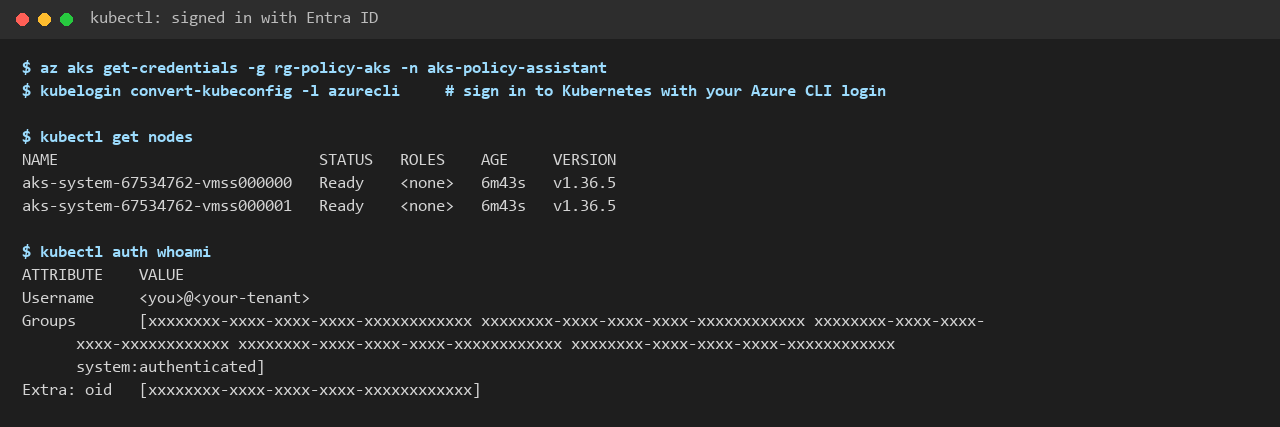
If PowerShell says “executable kubelogin not found”, kubelogin isn’t on your PATH. On my machine az aks install-cli said it had added it, but it hadn’t. Put the folder on the PATH for the current window (or add it to your user PATH for good):
$env:Path = "$HOME\.azure-kubelogin;$env:Path"
Now open the Argo CD dashboard. It isn’t exposed to the internet; you reach it through a private tunnel from your machine:
kubectl -n argocd port-forward svc/argocd-server 8080:443
Leave that running and open https://localhost:8080 (your browser will warn about the certificate: Argo CD uses a self-signed one for local access). Sign in as admin with the password from:
kubectl -n argocd get secret argocd-initial-admin-secret -o jsonpath='{.data.password}' | base64 -d
kubectl -n argocd get secret argocd-initial-admin-secret -o jsonpath='{.data.password}' | ForEach-Object { [Text.Encoding]::UTF8.GetString([Convert]::FromBase64String($_)) }
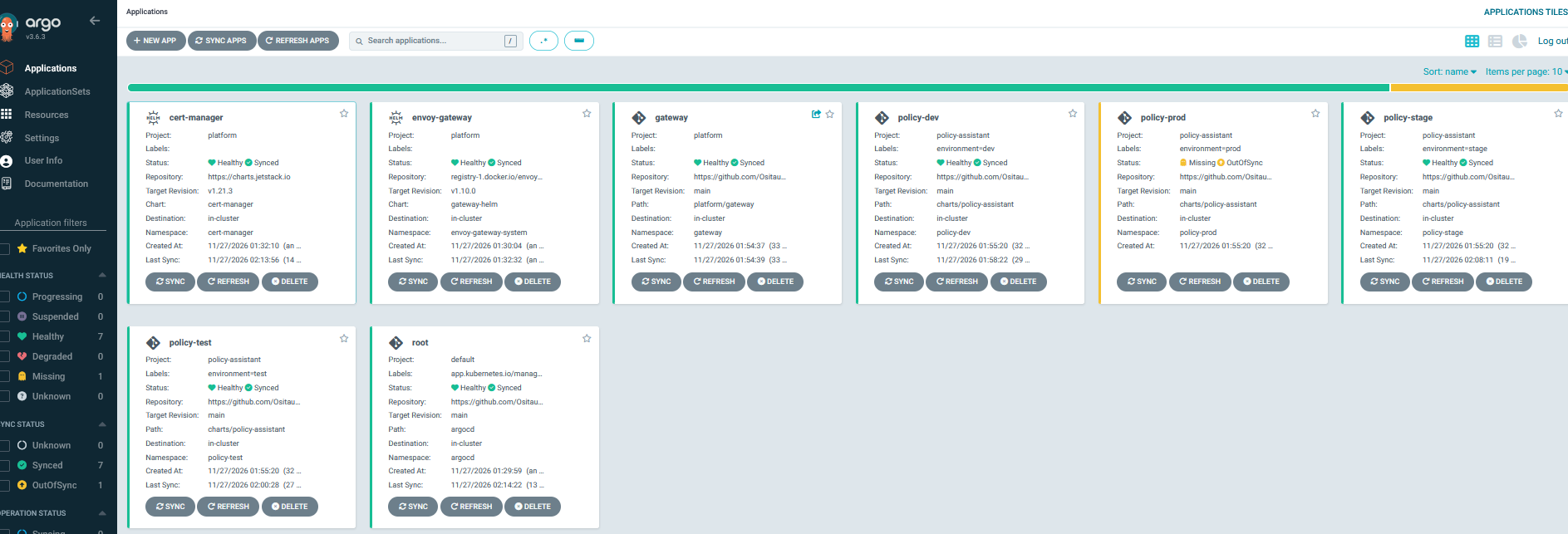
Argo CD installs the platform in order, using sync waves: the two projects first, then Envoy Gateway (which brings the Gateway API resource types), then cert-manager, then the Gateway and the Let’s Encrypt issuer, then the four environments. Within a few minutes:
- the Gateway takes your static IP;
- cert-manager requests one certificate per host name and Let’s Encrypt checks each one through port 80, which is why the DNS records matter. If you added them a little after the Gateway came up, that’s fine: cert-manager keeps checking until the names resolve. Mine were all Ready within about two minutes;
- the four environment apps appear. dev, test and stage show Healthy but run nothing yet, because their image tag is empty. prod shows OutOfSync / Missing: it never syncs on its own, by design.
You can check from the terminal too:
kubectl -n gateway get gateway,certificate
kubectl -n argocd get applications
Step 8: Fill in your Azure values
Now that layer 1 exists, the second half of the configure script fills in the values that came out of it (the four identity client IDs, the sign-in app’s client ID, your tenant) and the ones from your Policy Assistant (endpoints and group IDs). It reads Terraform’s outputs, so initialise layer 1 locally first; the setup script gave you access to the state:
terraform -chdir=infra/01-platform init \
  -backend-config="resource_group_name=rg-policy-aks-tfstate" \
  -backend-config="storage_account_name=<TF_STATE_ACCOUNT>" \
  -backend-config="container_name=tfstate"
python scripts/configure.py azure --backend-rg rg-policy-assistant-demo
git diff
Commit it through a pull request and merge it. Argo CD picks the change up from Git within about three minutes. Nothing runs yet; that’s the next step.
Step 9: Build once, deploy to dev and test
In GitHub, open Actions > build > Run workflow. It builds main of the Policy Assistant (my public repo, or change repository: in build.yml to your fork). The workflow:
- Builds the image once, tagged with the app’s short commit ID, and pushes it to your registry. If that commit was already built, it skips the build.
- Deploys to dev: it changes
image.taginenvironments/dev/values.yaml, commits that tomain, and stops touching anything. Argo CD notices the commit and rolls out the new version. - Checks dev: it calls
https://policy-dev.<your-domain>/healthzevery 20 seconds until it reports the new version, then runs the app’s self-test, which asks Azure OpenAI and AI Search a real question as dev’s managed identity. - Deploys to test the same way, and checks it the same way.
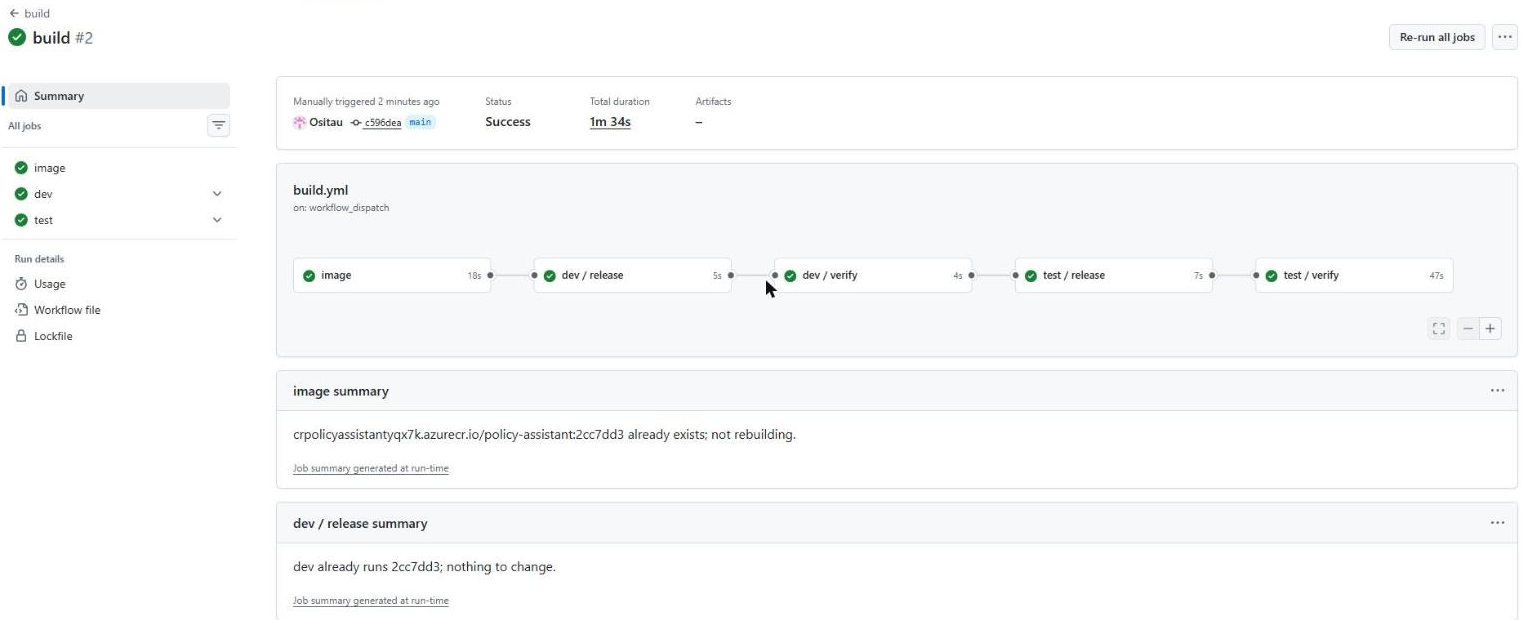
The check step is the important one. A green deployment pipeline that never looks at the live site tells you nothing; this one only goes green when the environment actually serves the new version and can reach Azure.
Step 10: Promote to stage (with approval)
Promotion copies the exact image tag from one environment’s file to the next. It never rebuilds, so stage gets the same image that passed test. Open Actions > promote > Run workflow and choose stage. The run stops and waits:
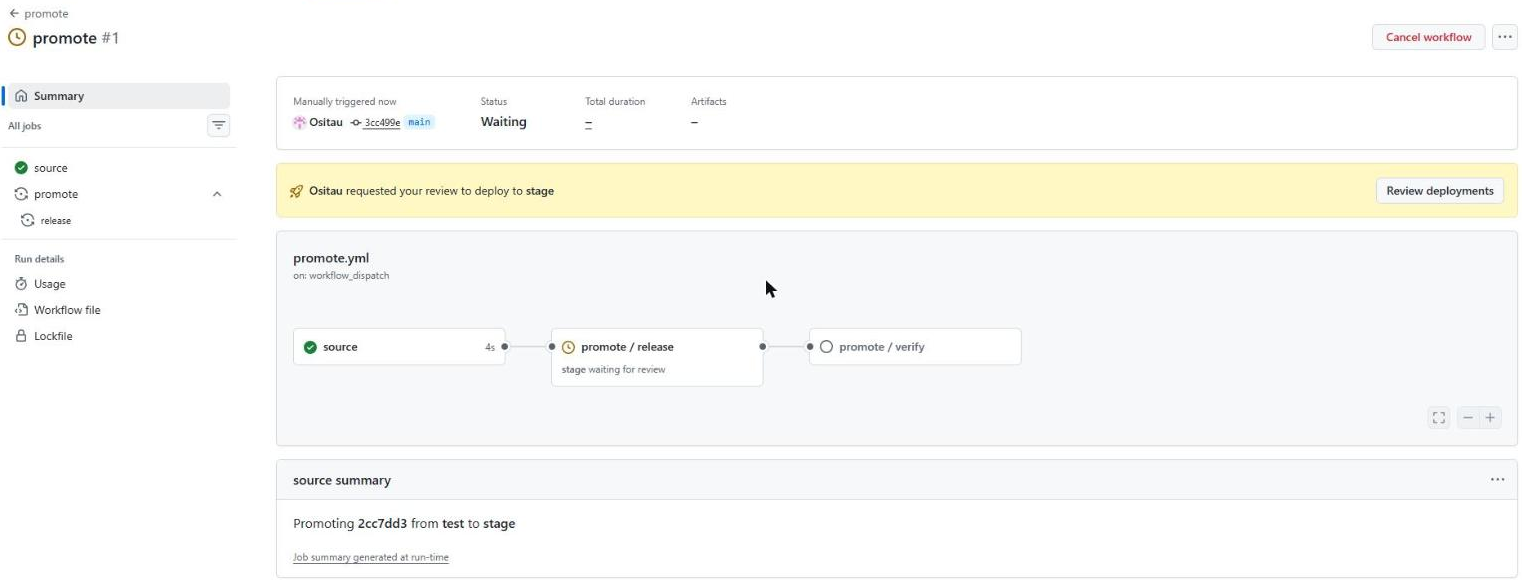
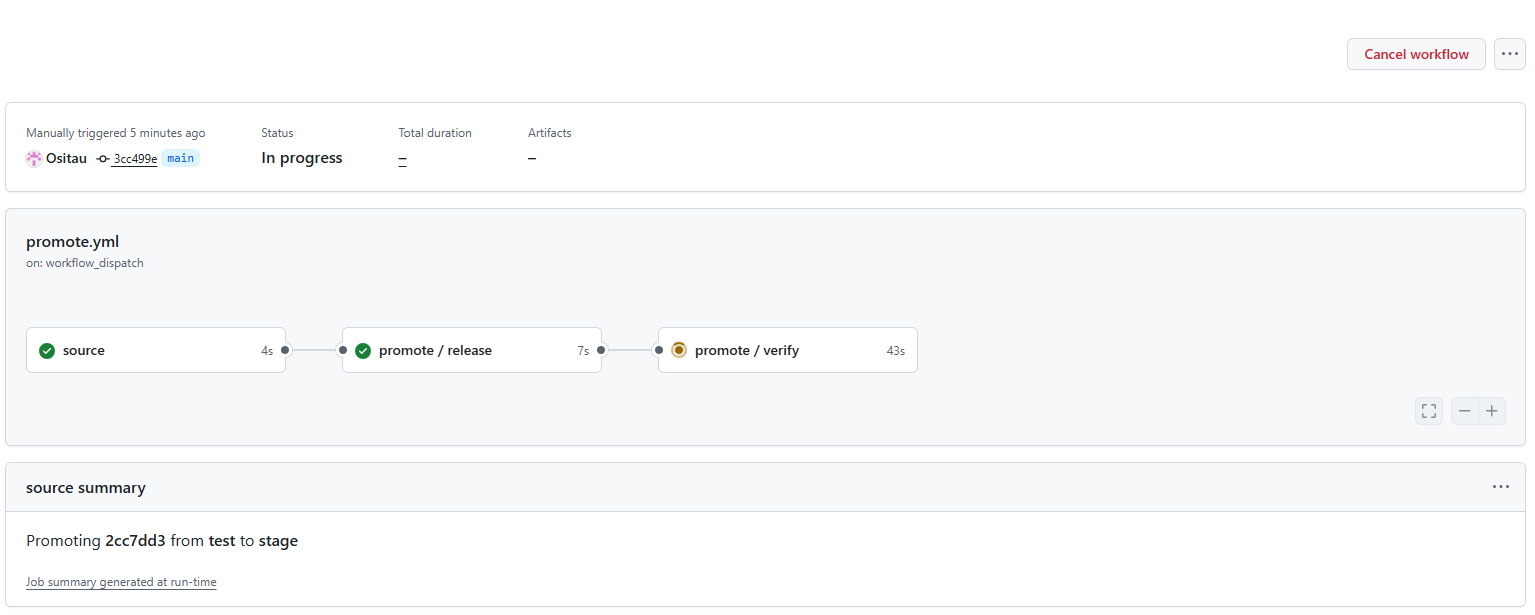
Click Review deployments, tick stage, and Approve and deploy. The workflow then changes stage’s tag in Git, Argo CD rolls it out to two pods, and the check confirms stage serves the new version:
Step 11: Promote to prod (approval plus Sync)
Run promote again and choose prod. Approve it in GitHub the same way. This time the Git change alone does nothing in the cluster: the prod app in Argo CD shows OutOfSync, and waits for a person to press Sync. That’s the second key, on purpose.
In the dashboard, open policy-prod, click Sync, then Synchronize. The prod workflow’s check waits up to 45 minutes for this, then confirms prod serves the new version and passes the self-test.
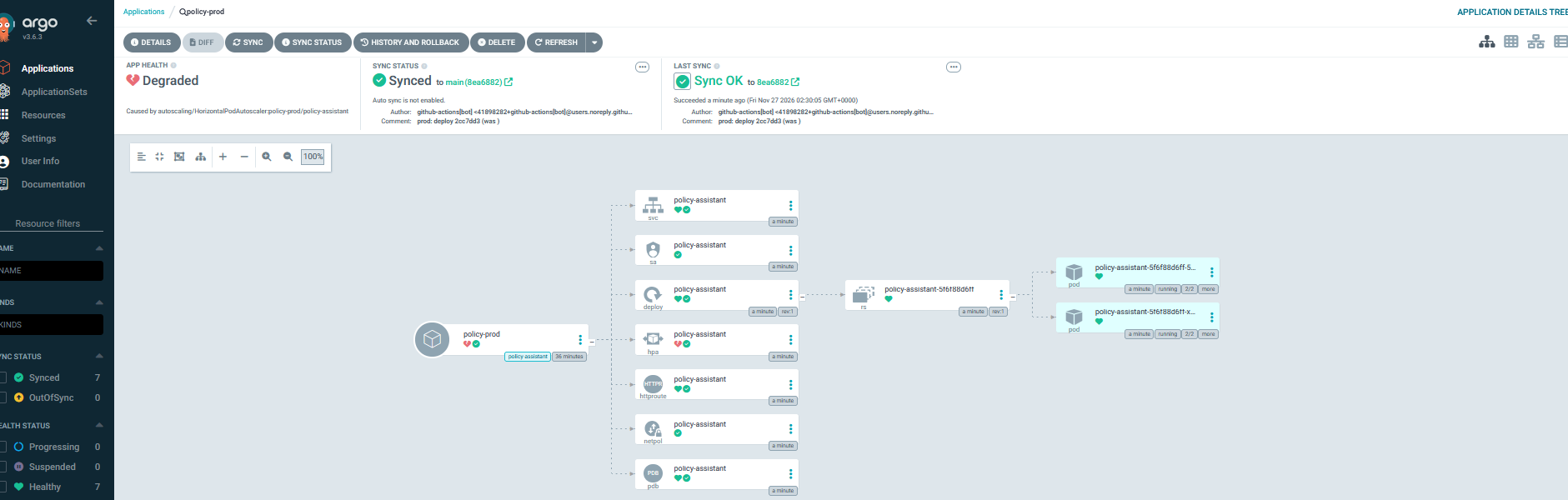
If prod shows Degraded right after the Sync, look at what it blames. Mine blamed the HorizontalPodAutoscaler, which has no CPU readings for its first minute. A minute later the autoscaler showed cpu: 2%/70% and the app was Healthy.
Step 12: Prove the security still works
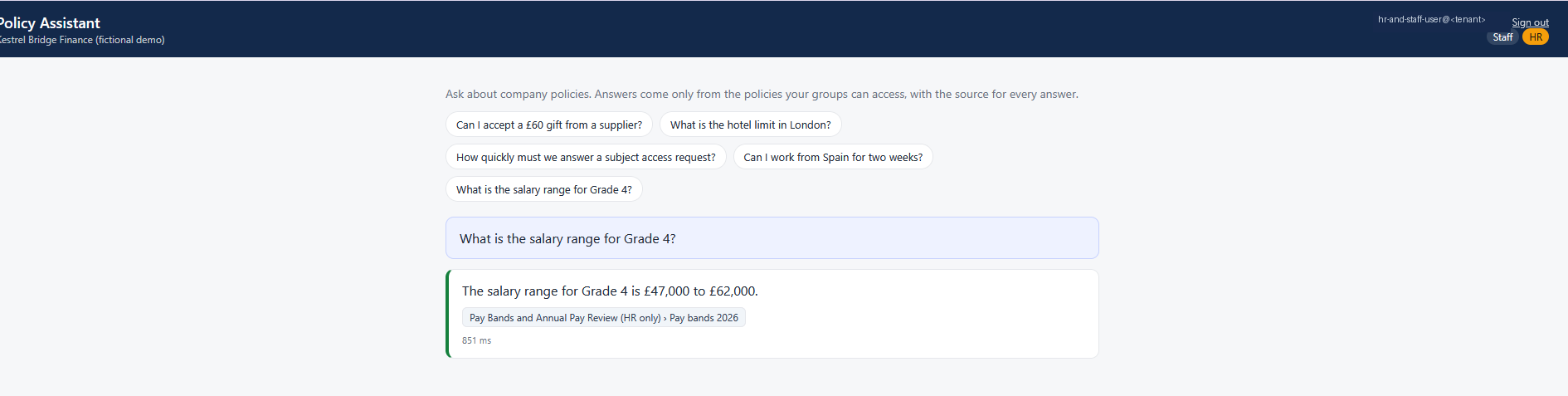
The whole point of this app is that people only get answers from documents their groups allow. On AKS that depends on oauth2-proxy passing the right groups, so test it with two users. Sign in at your prod address; the first time, Entra ID asks you to consent to the “Policy Assistant (AKS sign-in)” app.
A user in both Staff and HR asks for an HR-only fact, and gets it, with the source:
The Staff-only test user asks the same question and gets nothing, but still gets answers from Staff documents:
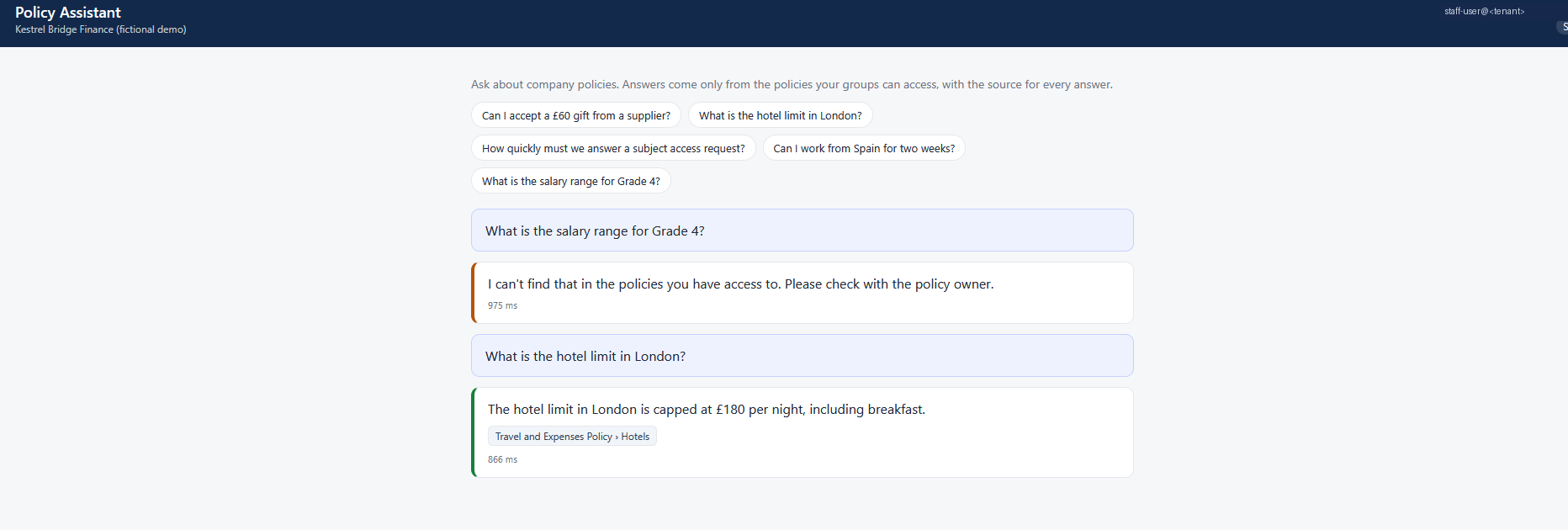
One thing that tripped me up: my first test question was about annual leave, and the answer was “I can’t find that”. It looked like a bug. It wasn’t: none of the ten demo policies covers annual leave, and the assistant refuses rather than inventing an answer. Test with questions the documents actually cover.
Problems I hit (all fixed in the repo)
You won’t hit these if you use the repo as it is, but they explain why some settings exist, and you may meet them in your own projects.
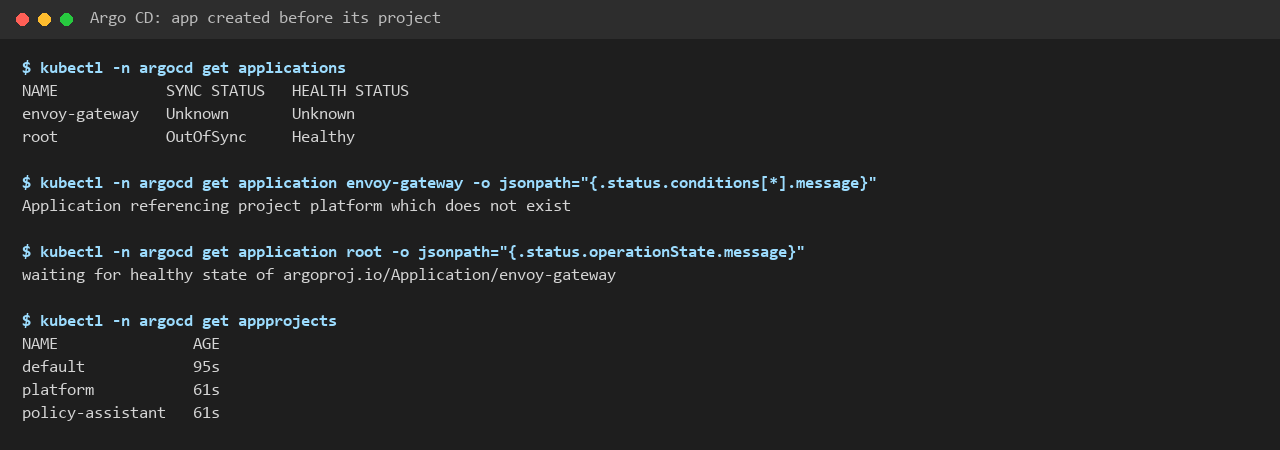
An app created before its project. On the first bootstrap, Argo CD created the envoy-gateway app in the same sync wave as the platform project it belongs to, and rejected it: “Application referencing project platform which does not exist”. The root app then waited for it to become healthy, forever. Fix: the two projects sync in wave -1, before anything that uses them.
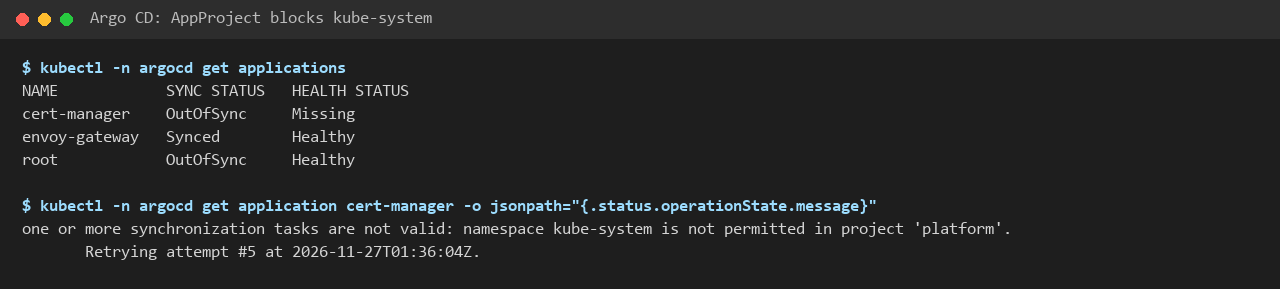
cert-manager blocked by the project rules. The cert-manager chart puts a small Role in kube-system, and my platform project didn’t allow that namespace, so Argo CD refused the whole sync. Project rules are a real guard rail: I allowed kube-system for the platform project only, not for the app.
The root app stuck on its first sync. Fixing the project in Git didn’t help on its own: the root app was still running its first sync from the old commit, waiting for cert-manager, which had given up after five retries. A running sync isn’t replaced by a newer commit. Fix: terminate the stuck sync (in the dashboard, open the root app and click Terminate), then sync cert-manager once. Remember this one: with sync waves, a child app that fails permanently blocks the whole root app.
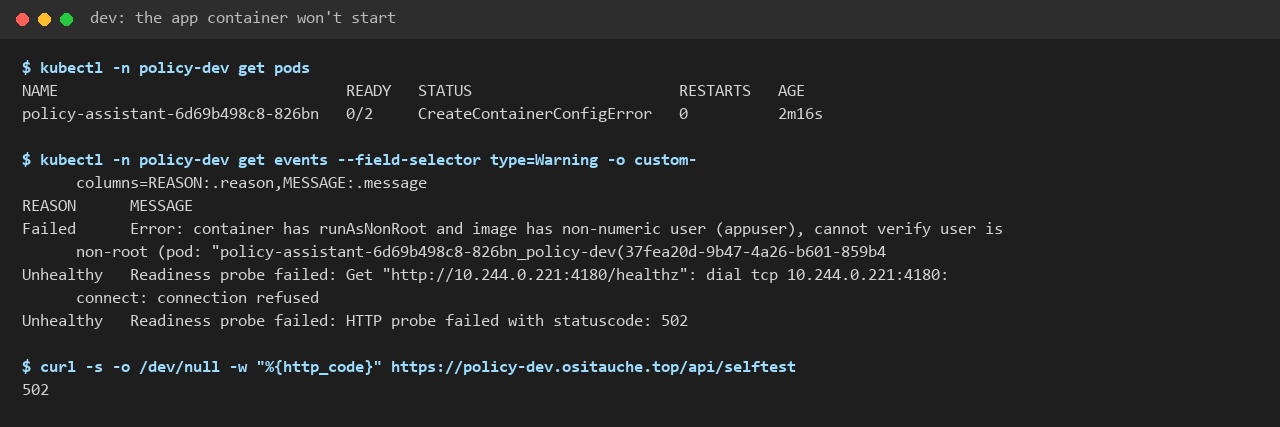
The app container wouldn’t start. “container has runAsNonRoot and image has non-numeric user (appuser), cannot verify user is non-root”. The Dockerfile runs as a user called appuser, and Kubernetes can only verify a numeric user ID. Fix: the chart sets runAsUser: 10001, the ID the Dockerfile gives that user.
cert-manager Healthy but always OutOfSync. Two things change its webhook after install, and neither is in Git: cert-manager fills in the webhook’s CA certificate, and AKS adds two rules so webhooks never touch its own system namespaces. Fix: tell Argo CD to ignore exactly those fields (ignoreDifferences in argocd/platform.yaml). Any chart with admission webhooks will need the AKS part.
The first build timed out on dev. I ran the first build before the platform was up, so dev’s check waited 15 minutes for an address that didn’t answer yet. The image and the Git change were fine; running the build again finished in under two minutes.
Clean up
When you’re done, delete everything in this order. Terraform removes the role assignments it made in your Policy Assistant’s resource group, which deleting resource groups alone would leave behind.
- Remove the four DNS records.
- Destroy layer 1 from your machine (layer 2 only lives inside the cluster, so it goes with it). Save your
TF_VARS_JSONvalue asinfra/01-platform/local.auto.tfvars.jsonfirst, then:
terraform -chdir=infra/01-platform destroy \
  -var="pipeline_object_id=<PIPELINE_OBJECT_ID>"
- Delete the state and the GitHub identity:
az group delete -n rg-policy-aks-tfstate --yes
az group delete -n rg-policy-aks --yes
az ad app delete --id <AZURE_CLIENT_ID>
The setup script also gave the GitHub identity roles in your Policy Assistant’s resource group (Reader, AcrPush, Azure OpenAI User and the limited role administrator). After deleting the app they show as “Identity not found” under Access control (IAM) on that resource group; remove them there.
Your Policy Assistant on Container Apps keeps running; nothing here touches it.
Summary
You now have the same app running in four environments on AKS, where Git is the only way in. One image is built per change, it’s promoted by changing one line, and stage and prod need a person to say yes. Each environment tells you exactly which build it runs, and no key or client secret exists anywhere in the setup.
The ideas I’d carry to any Kubernetes project: create the public IP outside Kubernetes so DNS never changes; give each environment its own identity; check the live site before calling a deployment done; order Argo CD apps explicitly with sync waves; and treat a HIGH finding as a question to answer, not a box to tick.
The code is at github.com/Ositau/policy-assistant-aks-gitops. If you build it and get stuck, use the contact form and tell me which step.