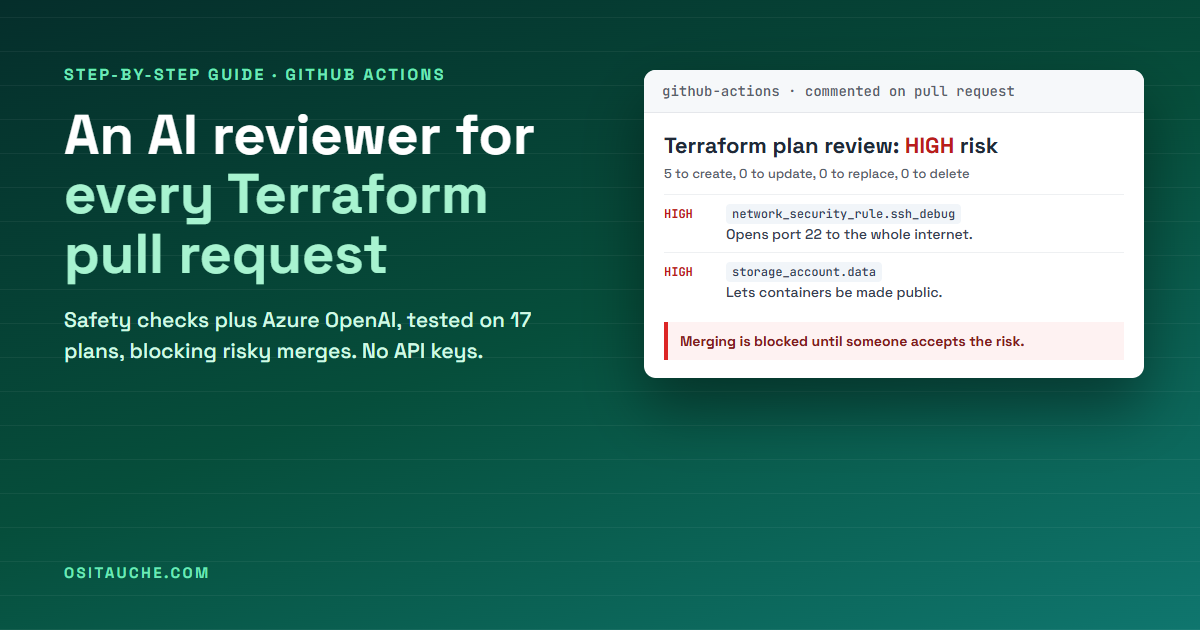
Summary: This guide builds a reviewer that reads every Terraform plan on a pull request, explains in plain English what will change, flags anything risky, and blocks the merge when the risk is high until someone accepts it. Fixed safety checks run first and can’t be overruled; Azure OpenAI then adds the things no rule covers, such as a VM size that multiplies the bill. It signs in with workload identity, so there are no API keys, and it’s tested against 17 example plans so you can prove it works. Everything is in my public repo, and each review costs well under a penny.
Nobody reads a 400-line terraform plan properly. I’ve approved plenty of pull requests where the plan said “1 to destroy” somewhere in the middle and nobody noticed until afterwards. This is my answer to that: let a tool read the plan every time, and make it hard to merge something dangerous by accident.
I built it, tested it, and broke it several times on the way. Every step below is what I actually ran, and the last section lists every error I hit with the fix. The code is at github.com/Ositau/ai-terraform-reviewer.
What you’ll end up with
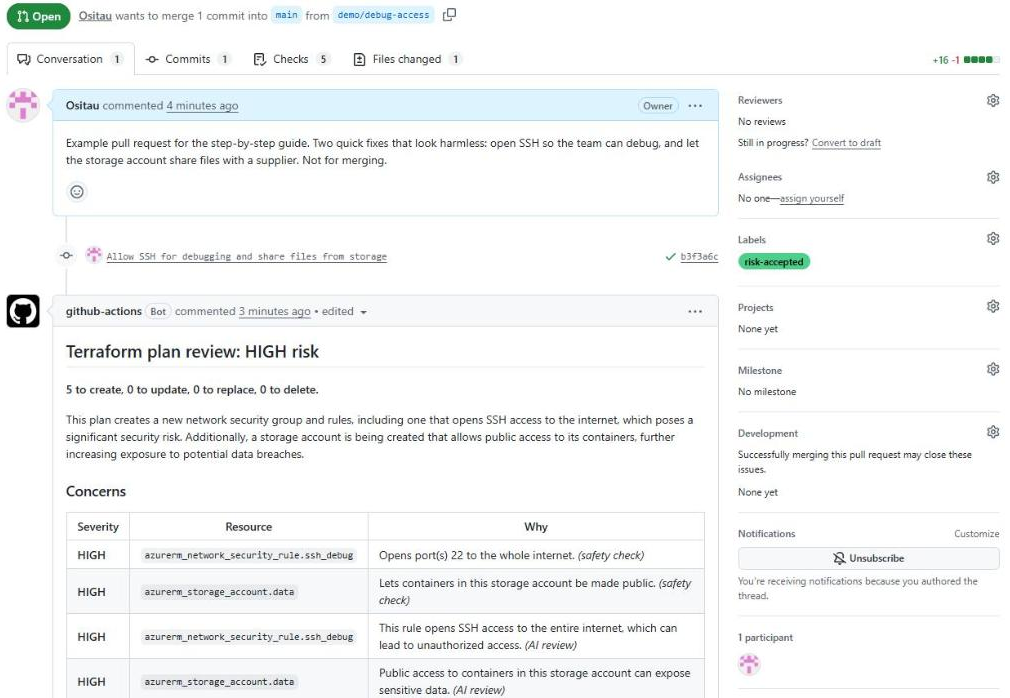
Open a pull request that changes Terraform, and a few seconds later this appears on it:
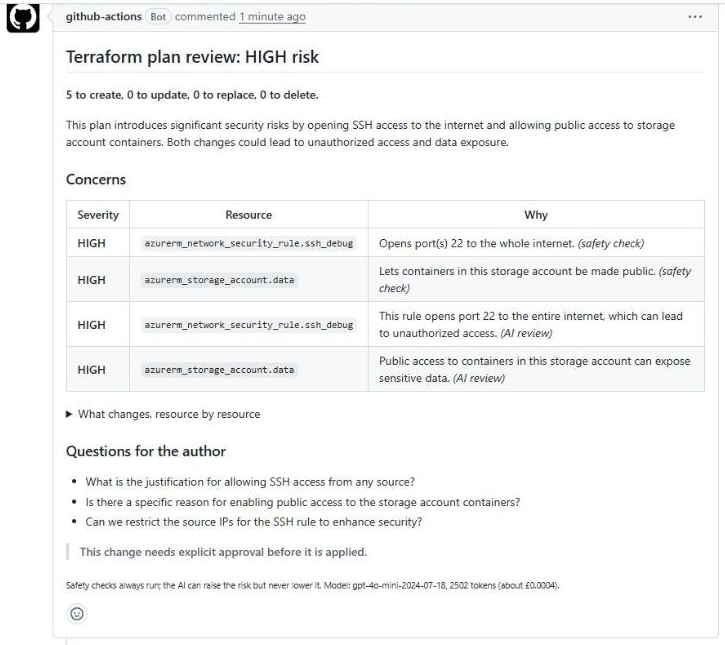
- A risk level: low, medium or high.
- A plain-English summary of what the plan does.
- A table of concerns, each marked as coming from a safety check or from the AI review.
- Questions for the author that a careful reviewer would ask.
- A failing check when the risk is high, so the pull request can’t be merged until someone with write access adds a
risk-acceptedlabel.
How it decides
It works in three steps, and the order matters:
- Fixed safety checks run first. They catch the dangerous basics every time: deleting or replacing anything that holds data, ports open to the whole internet, public storage, old TLS versions, broad roles such as Owner, database firewalls open to everyone.
- Azure OpenAI reviews the plan. It explains each change and adds concerns the rules don’t cover: a much bigger (and pricier) VM, HTTPS switched off, password login turned on, a Key Vault opened to all networks.
- The final risk is the higher of the two. The AI can raise the risk, but never lower it. If the AI is unavailable, the safety checks still run and the comment says so.
I did it this way because I don’t want a model to be the only thing standing between a pull request and a deleted database. The rules are the floor; the AI is the extra pair of eyes.
Secrets never reach the model. Anything Terraform marks as sensitive is replaced with (sensitive) before the prompt is built.
Before you start
You need:
- An Azure subscription where you can create a resource group and assign roles on it (Owner of a resource group is enough).
- Permission to create an app registration in Microsoft Entra ID. Most personal and test tenants allow this by default.
- A GitHub account.
- On your machine: Azure CLI, Git, Python 3.10 or later, and Terraform 1.9 or later (only for the optional example).
What it costs: Azure OpenAI is pay per use. A review uses 2,500 to 6,000 tokens, which is about £0.0004 to £0.001 with gpt-4o-mini. The whole 17-case test set costs about 0.3p to run. Nothing else in this guide has a running cost.
Step 1: Create Azure OpenAI and a model deployment
If you already have an Azure OpenAI resource with a gpt-4o-mini deployment, skip to the role assignment at the end of this step.
Pick a short unique name (letters, numbers and dashes) and create the resource:
az login
az group create -n rg-ai-reviewer -l swedencentral

az cognitiveservices account create \
  -n oai-reviewer-<unique> -g rg-ai-reviewer -l swedencentral \
  --kind OpenAI --sku S0 --custom-domain oai-reviewer-<unique> --yes

az cognitiveservices account deployment create \
  -n oai-reviewer-<unique> -g rg-ai-reviewer \
  --deployment-name gpt-4o-mini \
  --model-name gpt-4o-mini --model-version 2024-07-18 --model-format OpenAI \
  --sku-name GlobalStandard --sku-capacity 10
The --custom-domain matters: signing in with Entra ID (instead of a key) only works on an endpoint with a custom subdomain. I used Sweden Central with a Data Zone deployment to keep data in the EU; GlobalStandard is available in more regions. Any region where gpt-4o-mini is offered works.
Now give yourself permission to call it. This is the only role the reviewer needs:
OAI_ID=$(az cognitiveservices account show -n oai-reviewer-<unique> -g rg-ai-reviewer --query id -o tsv)
az role assignment create --assignee "$(az ad signed-in-user show --query id -o tsv)" \
  --role "Cognitive Services OpenAI User" --scope "$OAI_ID"
You should see: a JSON block describing the role assignment. Role assignments take a minute or two to apply.
If you run this from Git Bash on Windows and get MissingSubscription, see error 2 at the end. Git Bash rewrites the /subscriptions/... path.
Finally, note the endpoint. You’ll need it in every step from here:
az cognitiveservices account show -n oai-reviewer-<unique> -g rg-ai-reviewer --query properties.endpoint -o tsv
Step 2: Try it on your machine first
Before any pipelines, run it locally against the example plans in the repo. It’s the quickest way to see it work, and it needs nothing but the Azure OpenAI resource.
git clone https://github.com/Ositau/ai-terraform-reviewer.git
cd ai-terraform-reviewer
python -m venv .venv
source .venv/bin/activate          # on Windows: .venv\Scripts\activate
pip install -r requirements.txt pytest

export AZURE_OPENAI_ENDPOINT=https://oai-reviewer-<unique>.openai.azure.com/
export AZURE_OPENAI_DEPLOYMENT=gpt-4o-mini
Run the unit tests (no Azure needed):
pytest -q
You should see: 24 passed.
Review one of the dangerous example plans:
python -m reviewer eval/cases/vm-password-login.json --out review.md
echo "exit code: $?"
You should see: the review printed as Markdown, starting with ## Terraform plan review: **HIGH** risk, and exit code: 2. Exit code 2 means “the risk reached the level that should stop a pipeline”. 0 means it’s fine.
Now run the whole test set:
python eval/run_eval.py
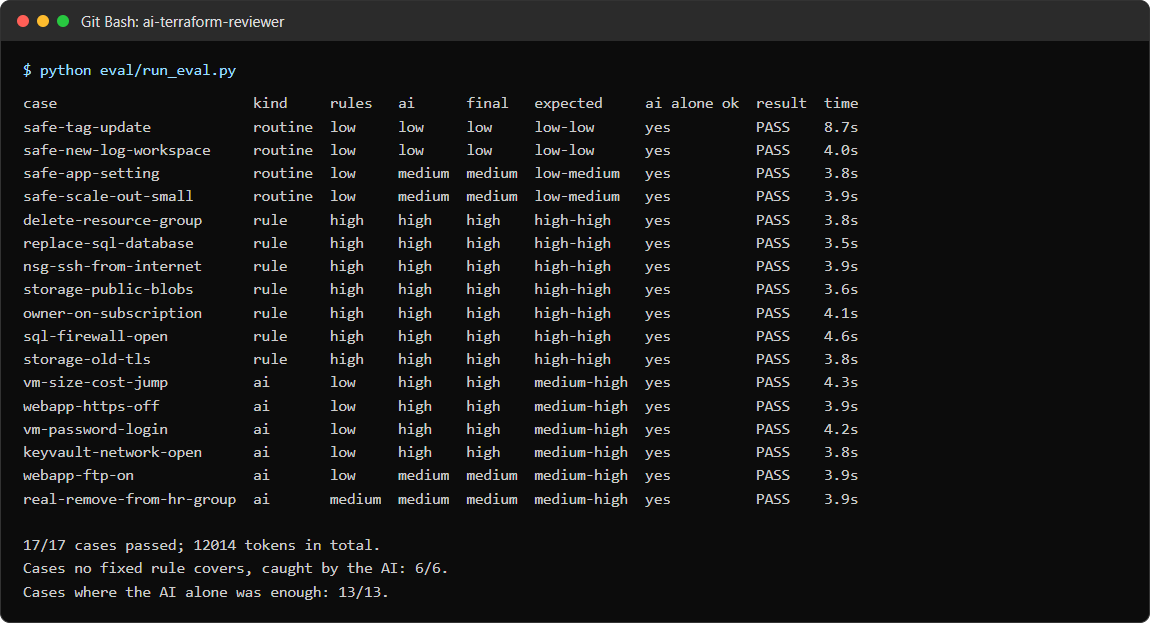
You should see: 17/17 cases passed. If you’re curious, python -m reviewer <plan> --no-ai runs the safety checks alone, so you can see what the AI adds.
How it works inside
The repo is small on purpose. Four files do the work:
| File | What it does |
|---|---|
reviewer/plan.py |
Reads the plan JSON, keeps only what changes, removes secrets |
reviewer/rules.py |
The fixed safety checks |
reviewer/ai.py |
The Azure OpenAI call: prompt and JSON answer format |
reviewer/report.py |
Combines both and writes the pull request comment |
Reading the plan. terraform show -json tfplan gives a large JSON document. For each changed resource, the reviewer keeps the action (create, update, replace, delete) and, for updates, only the attributes whose value changes. Two details took me a test failure to get right. Values Terraform marks as sensitive become (sensitive). Values it can’t know until apply (like the ID of a new resource) aren’t in the plan’s after block at all; they’re listed separately under after_unknown, so the reviewer adds them back as (known after apply).
The safety checks are plain Python functions, one per kind of danger. For example, the network rule check:
def check_nsg(c: Change) -> list[Finding]:
    if c.type != "azurerm_network_security_rule" or c.action == "delete":
        return []
    if str(_after(c, "direction", "")).lower() != "inbound" or str(_after(c, "access", "")).lower() != "allow":
        return []
    src = {str(_after(c, "source_address_prefix", "")).lower()} | {str(s).lower() for s in _after(c, "source_address_prefixes", []) or []}
    ports = {str(_after(c, "destination_port_range", ""))} | {str(p) for p in _after(c, "destination_port_ranges", []) or []}
    if src & OPEN_SOURCES and ports & ADMIN_PORTS:
        return [Finding(c.address, "high", f"Opens port(s) {', '.join(sorted(p for p in ports if p))} to the whole internet.")]
    ...
The AI review sends the cleaned-up changes and the rule findings to Azure OpenAI with three settings that make the answer usable by code, not just by people:
temperature=0, so the same plan gets (nearly) the same review.- A strict JSON schema (structured output), so the answer always has
risk,summary,changes,concernsandquestionsin the right shape. - Entra ID sign-in through
DefaultAzureCredential. On a laptop that’s youraz login; in GitHub Actions it’s the workload identity. No key is stored anywhere.
Combining them is one line: risk = worst(rule_risk, ai_risk). The comment starts with a hidden marker (<!-- ai-terraform-reviewer -->), so when the pipeline runs again it updates its own comment instead of adding a new one.
Why the reviewer has its own test set
A prompt is code. If I tweak it, or a newer model comes out, I want to know straight away if the reviewer got worse. So eval/ holds 17 plans, each with an expected range and a list of resources it must flag:
- 4 routine changes (tags, a new log workspace, a feature flag, one more VM). These should stay low or medium.
- 7 obvious dangers (delete a resource group, replace a database, SSH open to the internet, public storage, Owner on the subscription, an open database firewall, old TLS). The safety checks alone must catch these.
- 6 dangers no fixed rule covers (a VM resized to something enormous, HTTPS off, password login on, Key Vault opened to all networks, FTP turned on, and a real plan from one of my projects that removed someone from a security group). Only a good review catches these.
Every case passes when the final risk is inside its range and every must-flag resource appears in the concerns. The AI caught all 6 of the rule-blind dangers. CI runs this set automatically whenever the prompt, the rules or the cases change, so a “small tweak” can’t quietly make it worse.
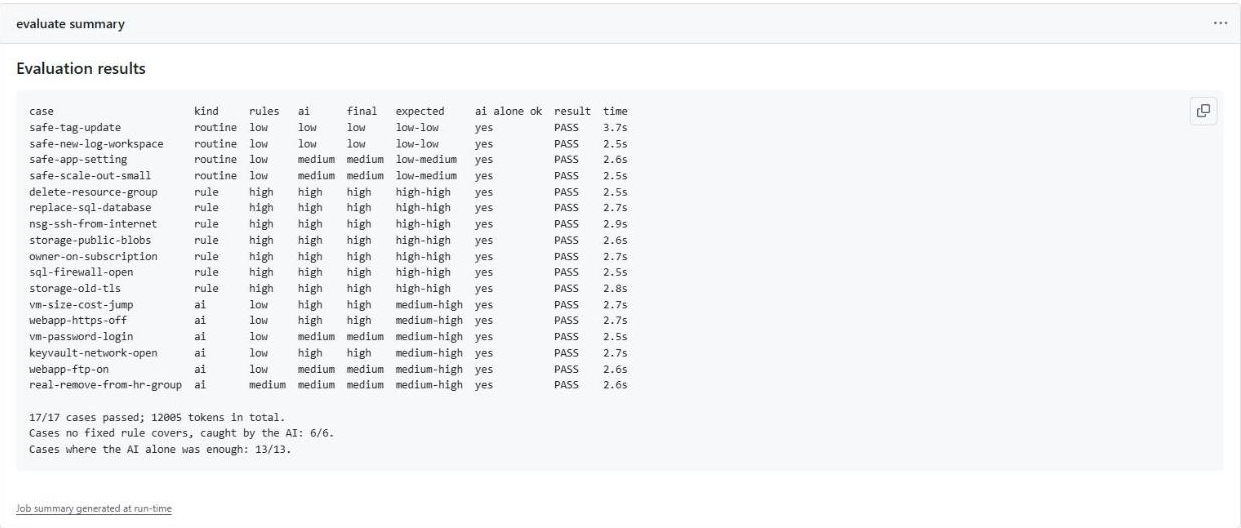
One honest finding: the AI leans cautious. It rated two routine changes (a feature flag and one more VM) as medium rather than low. That’s inside the allowed range, and I’d rather it was cautious than missed something.
Step 3: Fork the repo and enable Actions
To reproduce the pull request part, work in your own copy:
- Fork Ositau/ai-terraform-reviewer to your account.
- Open the Actions tab of your fork and click I understand my workflows, go ahead and enable them. GitHub switches Actions off on forks until you do.
The fork includes example/main.tf, a tiny Azure setup (a resource group, a storage account and a network security group) and .github/workflows/example-review.yml, which plans it and runs the reviewer on any pull request that changes it. The example is only ever planned, never applied, so it costs nothing.
Step 4: Create the sign-in identity for GitHub Actions
GitHub Actions signs in to Azure with workload identity federation: GitHub gives each run a short-lived token, and Entra ID trusts it because you’ve told it which repository and event to expect. No client secret is created.
Create the app registration and its service principal:
APP_ID=$(az ad app create --display-name "AI Terraform reviewer (GitHub Actions)" --query appId -o tsv)
az ad sp create --id "$APP_ID" -o none
SP_ID=$(az ad sp show --id "$APP_ID" --query id -o tsv)
Now the important part: the subject Entra expects. GitHub now includes the owner’s and repository’s ID numbers in it, in this format:
repo:<owner>@<owner id>/<repo>@<repo id>:pull_request
Many guides still show the older repo:<owner>/<repo>:pull_request, which no longer matches and fails with AADSTS700213. I lost a few runs to this (error 3 below). Get your two IDs from GitHub’s API:
curl -s https://api.github.com/repos/<you>/ai-terraform-reviewer | python -c "import json,sys; r=json.load(sys.stdin); print(r['owner']['id'], r['id'])"
Then create two federated credentials: one for pull requests (the reviewer) and one for the evaluation environment (the test set in CI):
OWNER=<you>; OWNER_ID=<owner id>; REPO_ID=<repo id>

az ad app federated-credential create --id "$APP_ID" --parameters "{
  \"name\": \"reviewer-pull-requests\",
  \"issuer\": \"https://token.actions.githubusercontent.com\",
  \"subject\": \"repo:$OWNER@$OWNER_ID/ai-terraform-reviewer@$REPO_ID:pull_request\",
  \"audiences\": [\"api://AzureADTokenExchange\"]}"

az ad app federated-credential create --id "$APP_ID" --parameters "{
  \"name\": \"reviewer-evaluation\",
  \"issuer\": \"https://token.actions.githubusercontent.com\",
  \"subject\": \"repo:$OWNER@$OWNER_ID/ai-terraform-reviewer@$REPO_ID:environment:evaluation\",
  \"audiences\": [\"api://AzureADTokenExchange\"]}"
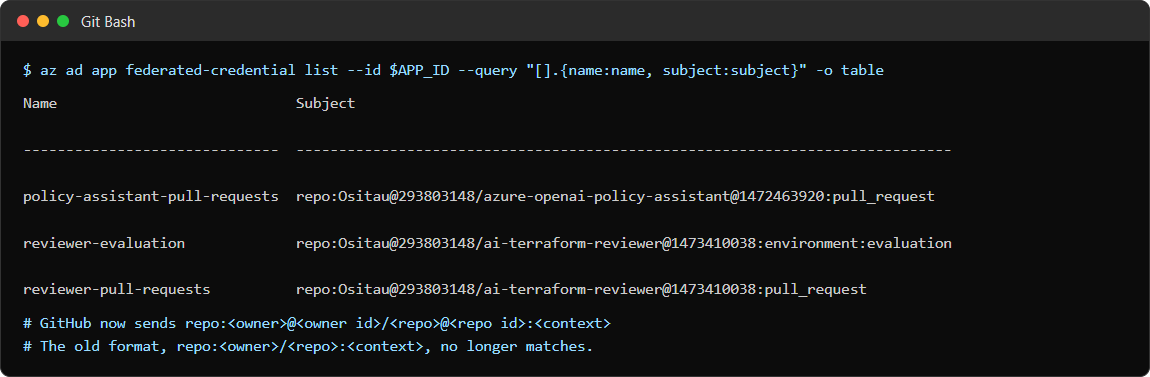
Give the identity the one role it needs:
az role assignment create --assignee-object-id "$SP_ID" --assignee-principal-type ServicePrincipal \
  --role "Cognitive Services OpenAI User" --scope "$OAI_ID"
That’s all for the example. Planning brand-new resources makes no calls to Azure, so it doesn’t need any other access. (Using it on your own, existing infrastructure needs a little more; see Step 8.)
Step 5: Add the repository variables
In your fork, go to Settings → Secrets and variables → Actions → Variables and add these. None are secrets, which is the point of workload identity:
| Variable | Value |
|---|---|
AZURE_CLIENT_ID |
the $APP_ID from Step 4 |
AZURE_TENANT_ID |
az account show --query tenantId -o tsv |
AZURE_SUBSCRIPTION_ID |
az account show --query id -o tsv |
AZURE_OPENAI_ENDPOINT |
your endpoint from Step 1 |
AZURE_OPENAI_DEPLOYMENT |
gpt-4o-mini |
Also create a label called risk-accepted under Issues → Labels → New label. Adding it to a pull request is how a reviewer accepts a high risk.
Step 6: Open a risky pull request
Create a branch and make two changes to example/main.tf that look like quick fixes. Make the storage account shareable:
allow_nested_items_to_be_public = true # so we can share files with the supplier
and add a rule so the team can SSH in to debug:
resource "azurerm_network_security_rule" "ssh_debug" {
  name                        = "allow-ssh-debug"
  priority                    = 110
  direction                   = "Inbound"
  access                      = "Allow"
  protocol                    = "Tcp"
  source_port_range           = "*"
  destination_port_range      = "22"
  source_address_prefix       = "*"
  destination_address_prefix  = "*"
  resource_group_name         = azurerm_resource_group.demo.name
  network_security_group_name = azurerm_network_security_group.web.name
}
Push the branch and open a pull request into your fork’s own main. (A pull request from your fork to my repository won’t get a sign-in token, because GitHub doesn’t hand them to workflows triggered from other people’s forks.)
You should see: the example-review / review check run for about 40 seconds, then a comment like the one at the top of this guide: HIGH risk, SSH open to the internet and public storage, each flagged by both a safety check and the AI. The check fails.
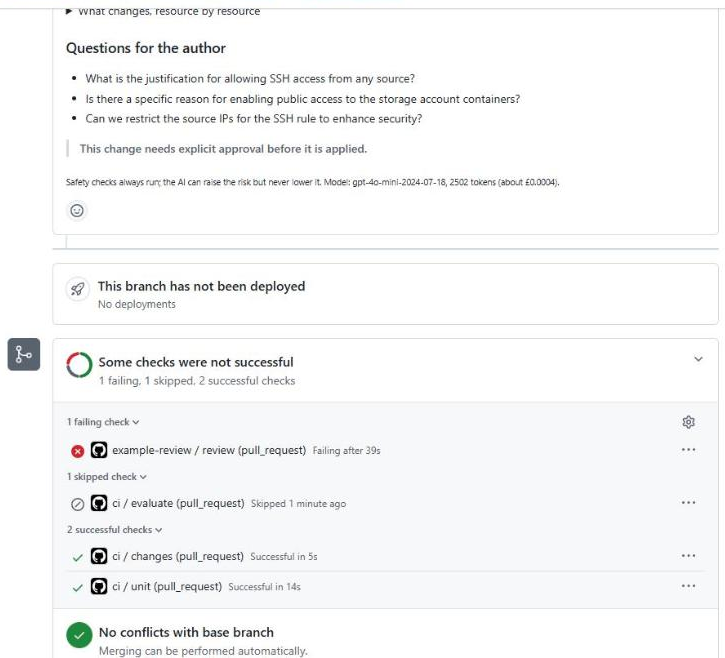
Now accept the risk: add the risk-accepted label to the pull request. The workflow listens for label changes, so it runs again, updates the same comment, and passes.
Step 7: Make the review a required check
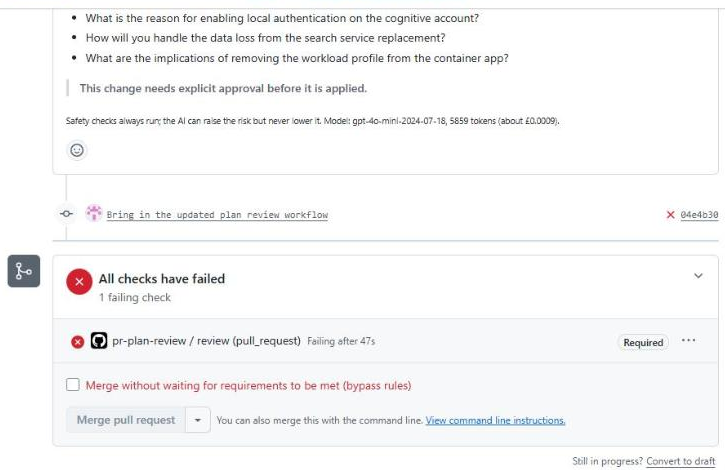
A failing check only blocks merging if branch protection says it must pass. In your fork, go to Settings → Branches → Add classic branch protection rule:
- Branch name pattern:
main - Tick Require status checks to pass before merging, search for
reviewand add it. - Click Create. GitHub will ask you to confirm your password or 2FA code.
You should see: on a high-risk pull request, “Merging is blocked due to failing merge requirements”, the check marked Required, and the Merge button greyed out.
Two things caught me out here:
- A required check must report on every pull request. If your workflow only runs when Terraform files change (a
paths:filter on the trigger), every other pull request sits forever at “Waiting for status to be reported”. On a repository where the check is required, run the workflow on every pull request and skip the work inside the job when nothing relevant changed. My workflow on a real project does exactly that withdorny/paths-filter. - Admins can still bypass it unless you tick “Do not allow bypassing the above settings”. I left that off on my own repos so my automation can still push, but for a team you probably want it on.
Step 8: Use it on your own Terraform
On an existing project, the reviewer needs a real plan, which means the workflow must read your Terraform state and, normally, refresh every resource. I didn’t want a pull request job to have write access or key access, so I gave it a read-only identity and planned accordingly:
- Reader on the resource group Terraform manages.
- Storage Blob Data Reader on the Terraform state container.
- Cognitive Services OpenAI User on Azure OpenAI.
Reader can’t call the “list keys” APIs that some resources use when Terraform refreshes them (AI Search admin keys, Log Analytics shared keys, Container App secrets), and it can’t write the state lock. So the pull request plan runs with two flags:
terraform plan -input=false -refresh=false -lock=false -out=tfplan
terraform show -json tfplan > plan.json
-refresh=falsecompares your code to the state without re-reading Azure. The trade-off: it won’t spot drift made outside Terraform. Your normal apply pipeline still does a full plan after merge.-lock=falsedoesn’t take the state lock, which would need write access. It’s a read-only plan that’s thrown away, so that’s safe.
Then add the reviewer as a step:
- uses: Ositau/ai-terraform-reviewer@main
  with:
    plan-json: plan.json
    azure-openai-endpoint: ${{ vars.AZURE_OPENAI_ENDPOINT }}
The job needs id-token: write (for the sign-in) and pull-requests: write (for the comment). The full workflow I use on my Policy Assistant project is pr-plan-review.yml.
What it caught on a real project
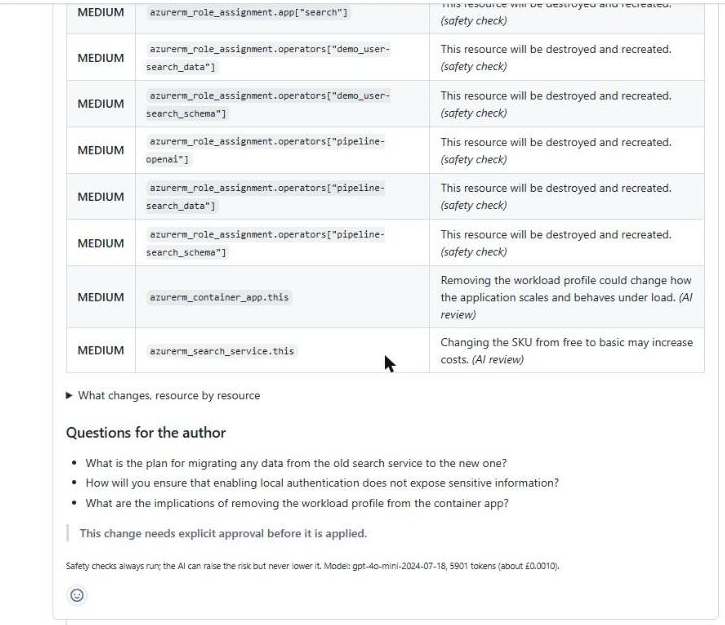
To test it on real infrastructure, I opened a pull request on my Policy Assistant project that looked like a tidy-up: “upgrade AI Search to the Basic tier and enable API keys on Azure OpenAI for testing”.
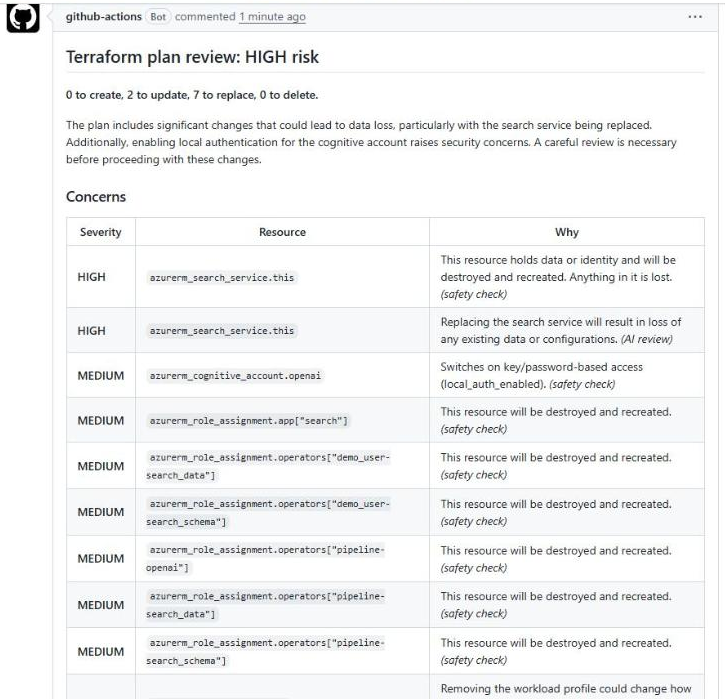
It rated it HIGH, for good reasons:
- Changing the AI Search pricing tier forces a replacement: the service is destroyed and recreated, and the search index with it.
- Six role assignments that point at the search service get recreated too.
- The new tier costs more.
- API keys get switched on for Azure OpenAI, which I’d deliberately turned off.
It also flagged a Container App setting that was different between the code and the deployed state, which wasn’t part of the pull request at all. I hadn’t noticed it. That’s the kind of thing I wanted this for.
Everything that went wrong
These are the real errors I hit, in order, and how I fixed each one.
1. The parser dropped values Terraform doesn’t know yet
A unit test failed with KeyError: 'id'. Terraform leaves values it can’t know until apply out of the plan’s after block and lists them in after_unknown instead. My parser only read after, so the AI never saw that those attributes existed.
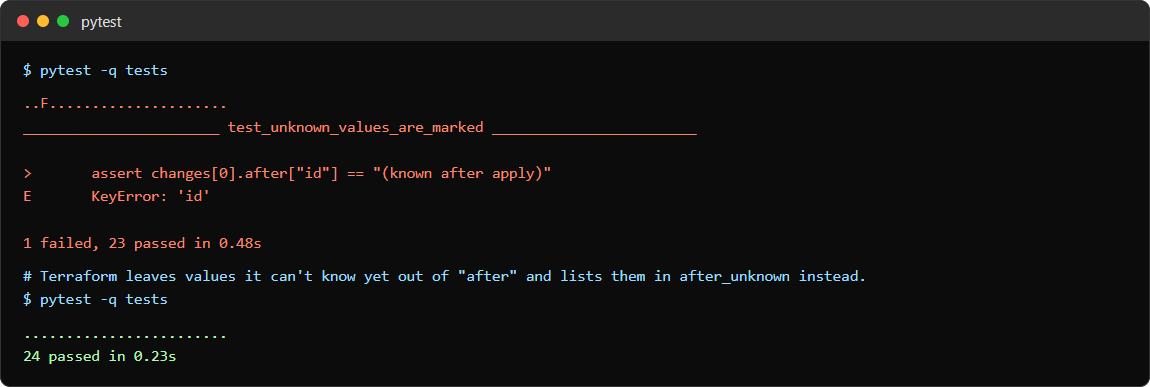
Lesson: test against the real plan format, not the one you imagine.
2. MissingSubscription when creating role assignments from Git Bash
az role assignment create --scope "$RGID" failed with (MissingSubscription) The request did not have a subscription or a valid tenant level resource provider. The error points at Azure, but the cause is the shell: Git Bash on Windows rewrites any argument that starts with / into a Windows path, so /subscriptions/... became C:/Program Files/Git/subscriptions/....
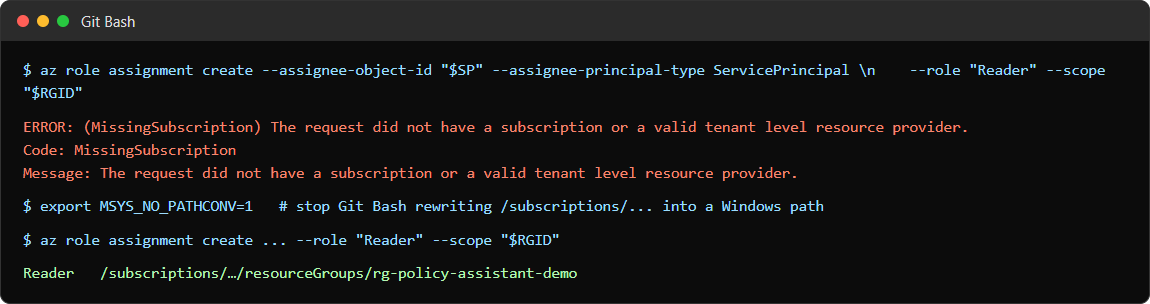
Fix: export MSYS_NO_PATHCONV=1 before running the az commands.
3. GitHub Actions couldn’t sign in: AADSTS700213
The azure/login step failed with AADSTS700213: No matching federated identity record found for presented assertion subject 'repo:Ositau@293803148/azure-openai-policy-assistant@1472463920:pull_request'. My federated credential used the older name-only format, repo:Ositau/azure-openai-policy-assistant:pull_request. GitHub now sends the owner and repository IDs as well.
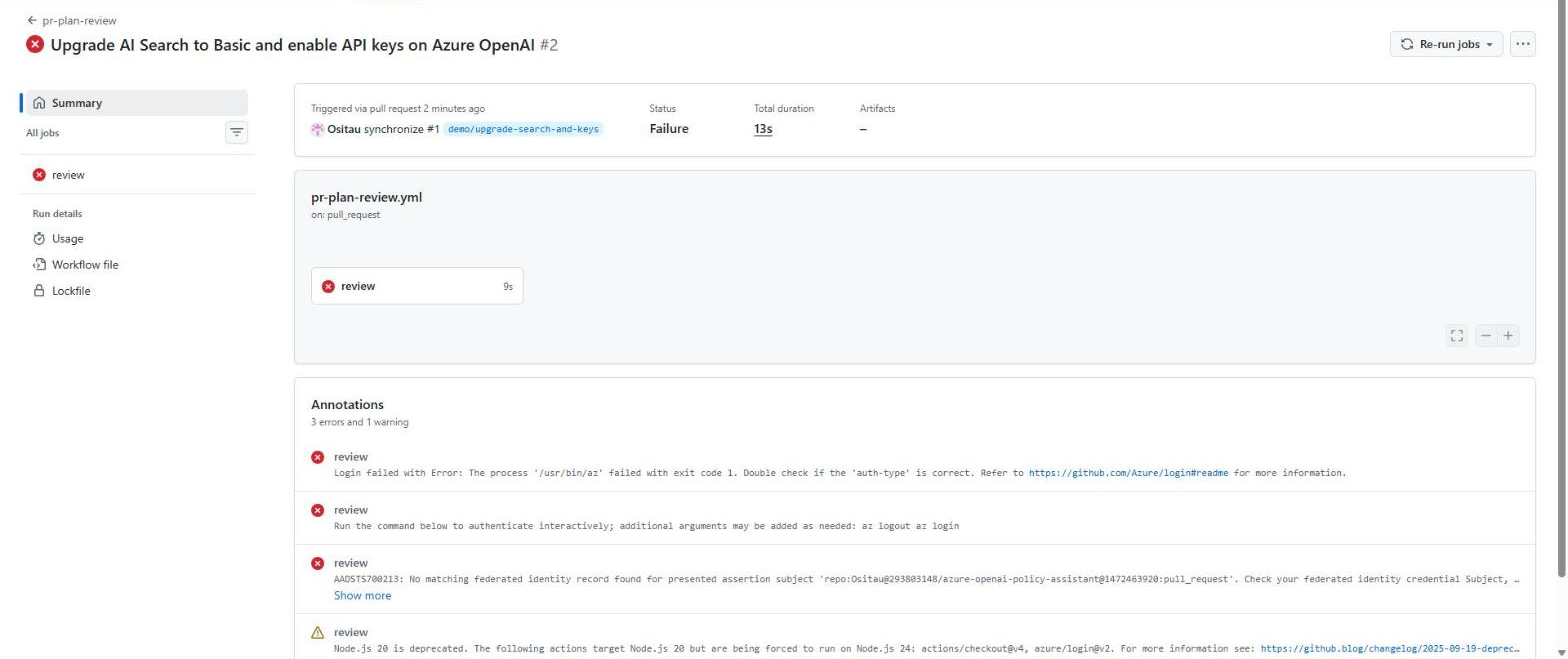
Fix: update the federated credential’s subject to exactly what the error shows. Then wait a few minutes: my first re-run, less than a minute after the change, failed the same way. The next one worked. I’ve written this one up separately because it will trip up a lot of people: GitHub Actions can’t sign in to Azure? The OIDC subject changed.
4. Tests passed on my machine and failed in GitHub Actions
The unit job failed with exit code 2: No module named 'reviewer'. Locally I’d been running python -m pytest, which adds the current folder to Python’s import path. CI ran plain pytest, which doesn’t.
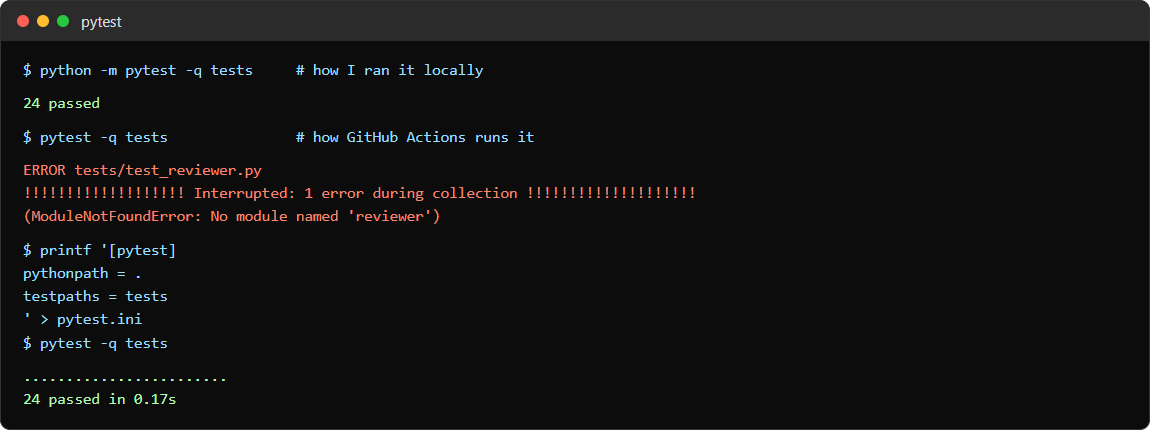
Fix: a pytest.ini with pythonpath = .. Lesson: run tests locally exactly the way CI runs them.
5. A required check that only runs on some pull requests
Covered in Step 7: if the check is required, it has to report on every pull request, or unrelated ones wait forever. Run the workflow always and skip inside the job.
6. GitHub asked me to confirm access, twice
Saving branch protection needs “sudo mode”: GitHub asks for your password or 2FA code. I confirmed in one browser tab and it asked again in the tab where the change was being saved. Not a bug, but expect it.
7. The same plan, slightly different answers
At temperature 0, the model rated “password login turned on” as high in one run and medium in another. Both passed, because each test case has an allowed range rather than one exact answer. Lesson: model output isn’t perfectly repeatable, so test with ranges and must-flag lists, and keep the fixed checks as the floor.
8. A noisy comment when one replacement causes others
On the real project, replacing the search service also replaced six role assignments, and the comment listed each one as a separate medium concern. Accurate, but noisy. Grouping replacements caused by a parent resource is on my list.
Limits worth knowing
- It reviews the plan, not your code style or module design.
- With a read-only identity, the plan doesn’t refresh, so drift made outside Terraform isn’t shown.
- The safety checks cover common Azure resources. Other providers get the AI review only, until you add rules for them.
- It’s an extra reviewer, not a replacement for one. The point is that a person reads the high-risk changes with the right questions in front of them.
Tidying up
If you followed along and want to remove everything:
az group delete -n rg-ai-reviewer --yes
az ad app delete --id "$APP_ID"
Then delete your fork, or the branch protection rule and variables in it.
The full code, the example and the test set are at github.com/Ositau/ai-terraform-reviewer. If you build it and get stuck on a step, open an issue there and tell me what you saw.